03-Application-Architecture Backend Design-Patterns
<< ---------------------------------------------------------------- >>
--- Last Modified: $= dv.current().file.mtime
Example
<< ---------------------------------------------------------------- >>
https://www.youtube.com/watch?v=_UZ1ngy-kOI
Designing Stages For User Facing Applications
- Requirements
- Core Entities
- API
- High-level Design
- Deep Dives Primary goal of 1 and 5 is to satisfy non functional requirements, while primary goal of 2 to 4 is to satisfy functional requirements.
Requirements
Functional Requirements(core features of the system):
- upload a file
- download a file
- automatically sync files across devices
Non functional requirements(qualities of the system)
- CAP Theorem(Consistency, availability)
- CAP Theorem: in the context of any distributed data store, it can only guarantee two out of the three of the following: consistency, availability, partition tolerance
- In this context Consistency is less important than availability and partition tolerance is a must
- this means that if someone in Germany edits a file, it is fine for someone in the US to see the old version of a file(everyone has to see a file at all times no matter what, even if it is an older version)
- low latency uploads and downloads (as low as possible)
- Support large files as large as 50gb
- resumable uploads.
- high data integrity(sync accuracy)
Core Entities
File(raw bytes) stored in S3 File Metadata Users
API
POST /files → 200 body: File & File Metadata & User
GET /files/fileID → File & File Metadata
GET /changes?since={timestamp} → fileMetaData[](list of files changed)
High Level Design
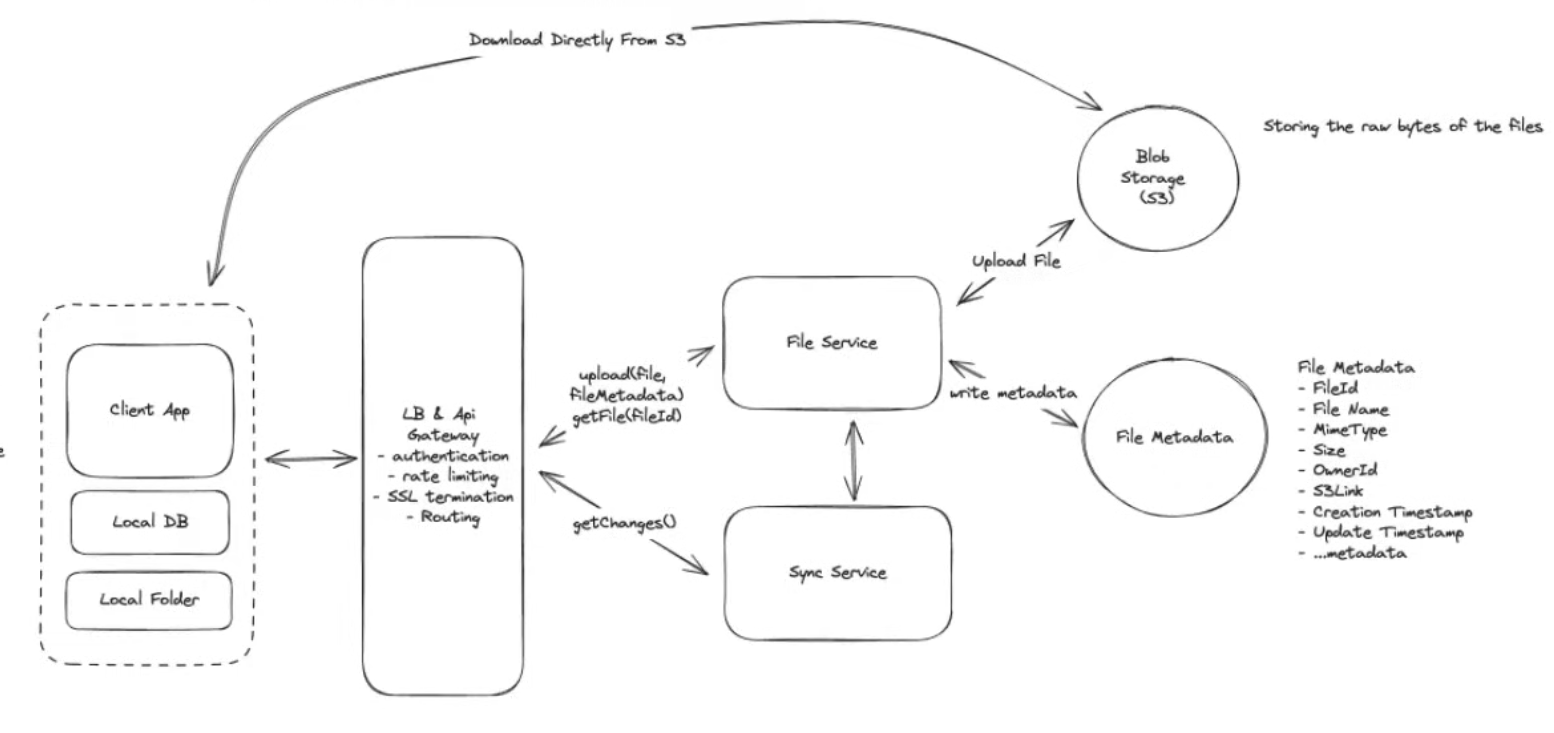
Deep Dive
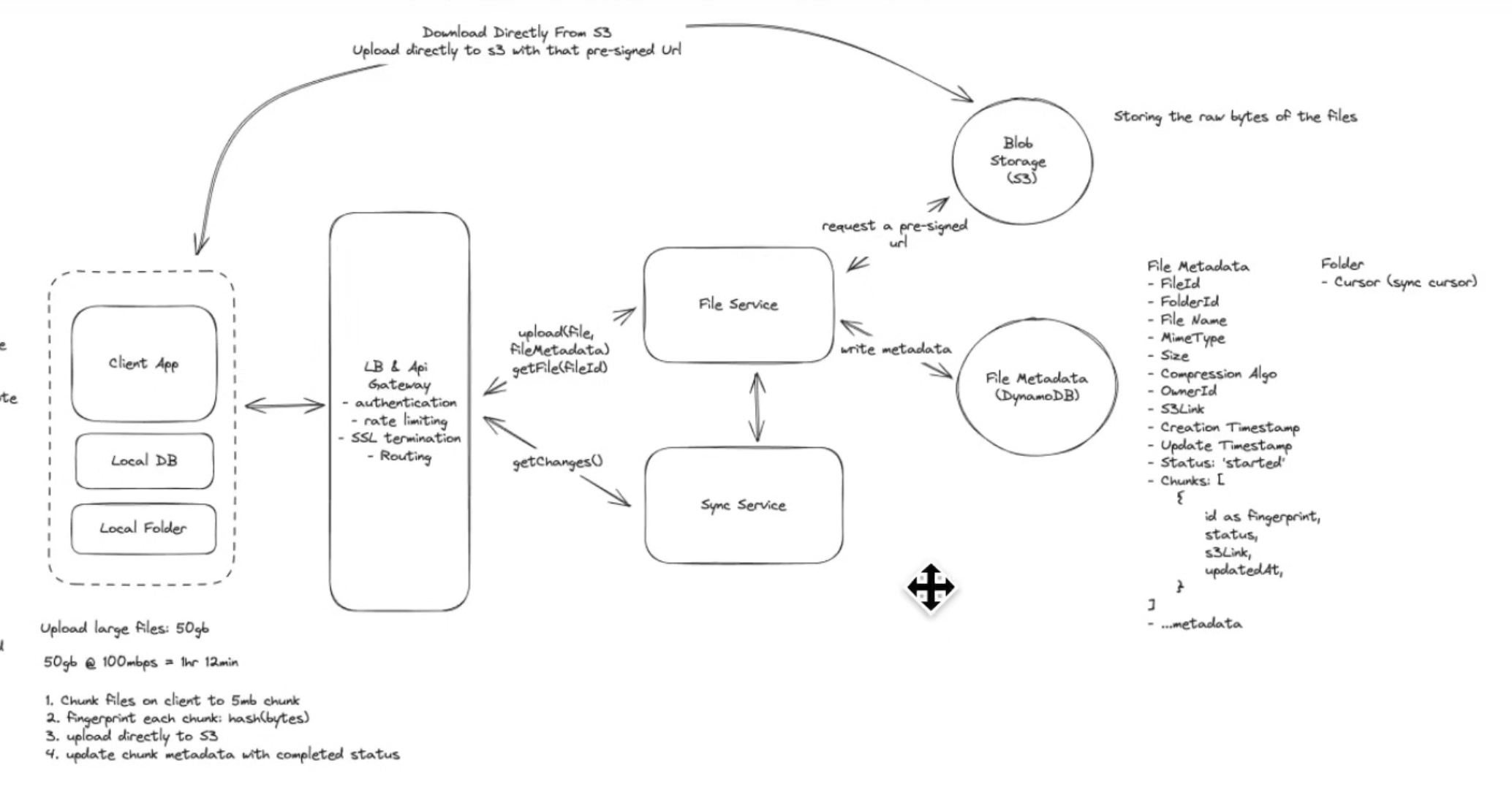
Large File Issues: This design only works for files as large as 10 15 MB.
- uploading to the server first and then to the S3 Blob storage is redundant. You should upload directly from the client to the s3.
- you do this by sending the metadata to the server and get a pre-signed url for the s3 object
- send the url to the client which is then used to upload the file directly.
- POST BODY has a limit on size.
- way to get around it is by using chunking
- Will have to compare local and cloud chunks to see which ones still have to be uploaded, things like locally indexing it will create inconsistency problems.
- we use fingerprinting to solve this problem???
- you hash the bytes of the file and use it as a fingerprint
- we use the finger print as an ID.
- How do you update the status of the chunks uploaded in the cloud DB?
- you could get the status from the s3 after each chunk is uploaded and make an additional request to the server DB to update it, but relying on the client to do this could be unreliable.
- Use the trust but verify pattern. You basically make an additional request from the backend to the s3 to see if the chunk was uploaded and then update the DB chunk status.
- a lot of BLOB storages also support some kind of notification to the backend when a chunk gets uploaded they send in a request to say it was successful.
- Low Latency Upload and Download
- could add a CDN
- but since most users are downloading and uploading their own files, they most often will not be accessing them from a region outside of where their bucket is located, thus CDNs will most likely not be necessary.
- Could also transfer fewer bytes, by using compression (gZip).
- but only certain file types benefit a lot from compressions(text files, but media files usually are already compressed depending on their file type)
- so you can compress based on the file type and file size, since compressing and decompressing is CPU intensive and will slow things down.
- could add a CDN
- Syncing:
- As fast as possible
- how to know when there is changes?
- could periodically pull for changes
- adaptive pulling, change the delta between pulls depending on wether the client is open, and which folder the client is focused on.
- could use Web-sockets.
- overkill, a persistent connection at all times between the client and the server is too expensive.
- long polling:
- make a request and keep it open for a minute or so until the next change is sent by the server and then we initiate another request
- we dont know when the changes will happen so probably not.
- could periodically pull for changes
- how to know when there is changes?
- sync to be consistent
- could periodically make a request to the database, to get the folder ID or file ID of the files that have had any chunks be updated or changed since the last sync.
- This is what drop box actually does:
- event box with a cursor:
- Event Stream(kafka)
- we put the change event on any files into the kafka stream.
- each folder will have a sync cursor
- after each pull, update the cursor to see up until which event from the event bus was consumed by the client
- provides audits and version control(basically what git does lol)
- Event Stream(kafka)
- event box with a cursor:
- Reconciliation:
- periodically do reconciliation if there is inconsistencies between the local and cloud files.
- As fast as possible