<< ---------------------------------------------------------------- >>
--- Last Modified: $= dv.current().file.mtime
S3
<< ---------------------------------------------------------------- >>
S3 Bucket Classes
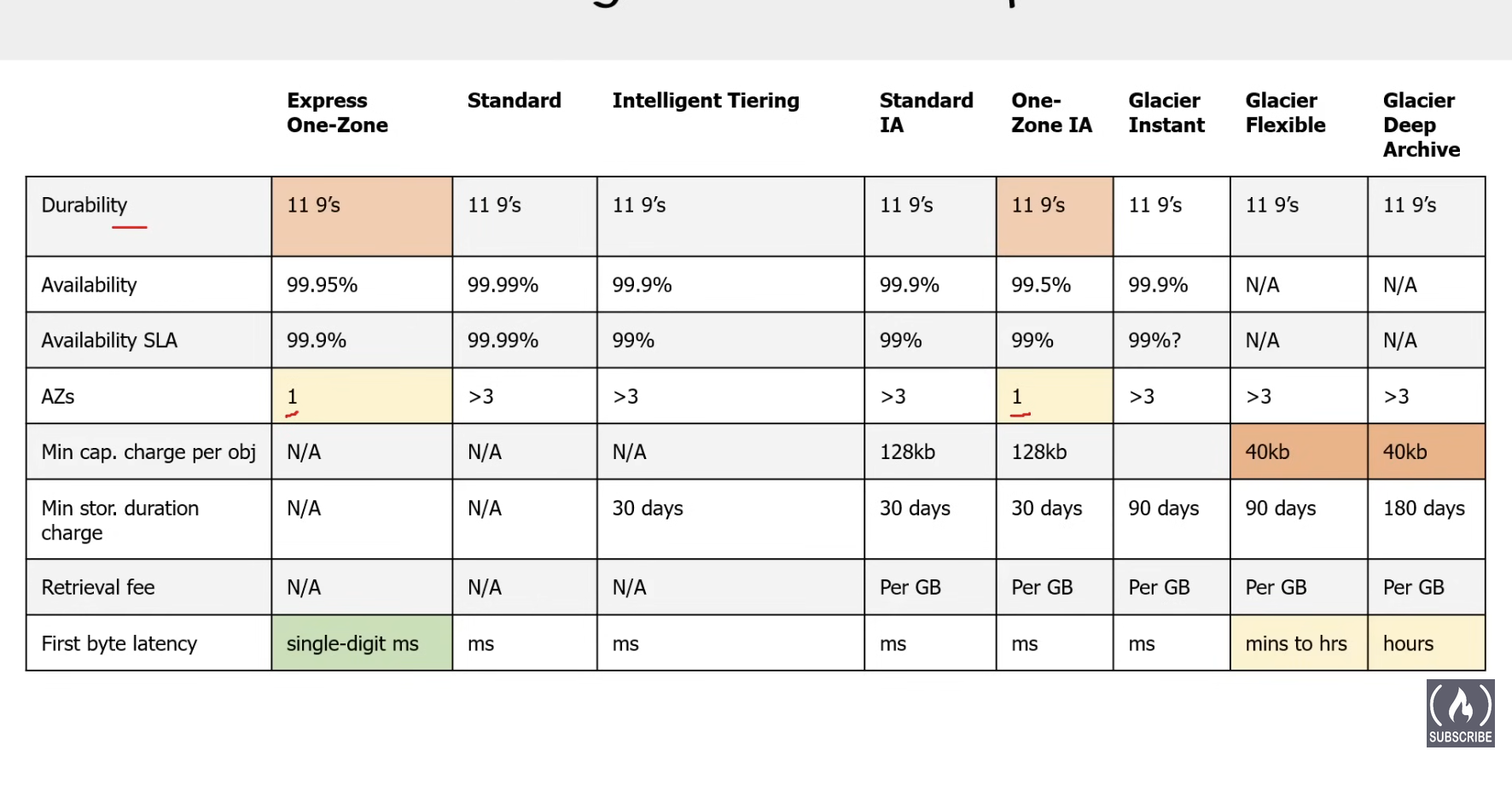
S3 has different classes that trade retrieval time, accessibility and durability for cheaper storage.
- Default: Fast, 99.99% availability, very durable and is replicated across at least three AZs
- Intelligent Tiering: Uses ML to analyze object usage and determine the appropriate storage class. Data is moved to the most cost-effective access tier, without any performance impaact or overhead.
- Intelligent Tiering Archive Access Tier (within minutes)
- Intelligent Tiering Deep Archive Access (12 hours)
- Standard-IA (infrequent Access): Still same as standard but for files u access once a month. If more additional fees apply. (50% less availability than standard).
- One-Zone-IA: still fast but only in one AZ instead of 3. Cheaper than Standard-IA, but data could get destroyed.
- One-Zone-Express: uses directory bucket, has the lowest latency of all the s3 buckets and has a flat charge rate for up to 512kb files. costs are 50% lower than s3 standard
- S3 Glacier Instant Retrieval 1. data accessed once per quarter 2. rarely accessed data that needs immediate access. 3. minimum storage duration of 90 days. 4. Not a separate service than S3 and does not require a vault
- S3 Glacier Flexible Retrieval 1. 3 tiers for retrieval speeds 1. expedited tier 1-5 min 2. standard 3-5 hours 3. bulk tier 5-12 hours 2. not a separate service than s3 and does not require a vault
- S3 Glacier vault: For long-term cold storage. Retrieval of data can take minutes to hours but the off is very cheap storage.
- S3 Glacier Deep Archive: lowest, data retrieval time is 12 hours.
- Standard 12-48 hours
- no archive size limit, default
- bulk tier 12-48 hours
- for petabytes of data
- for petabytes of data
- Standard 12-48 hours
- S3 Glacier Deep Archive: lowest, data retrieval time is 12 hours.
Bucket Overview
Naming Rules
similar to URL rules since the name is used to form the S3 URLs.
Length: 3-63 characters Characters: lowercase, numbers, dots, hyphens Start and End: must begin and end with a letter or number Adjacent Periods: no two adjacent periods are allowed IP address Format: cant be in IP address format Restricted Prefixes: “xn—”, “sthree-” Restricted Suffixes: cant end with “-s3alias” or “—ol-s3” Uniqueness: must be unique across all aws accounts in all regions in a partition Exclusivity: name cant be used twice unless the bucket is deleted Transfer Acceleration: buckets used with transfer acceleration cant have dots in their names.
Restrictions and Limitations
can create up to 100 buckets by default, can craete a service request to increase to a 1000
have to empty a bucket to delete first
no max bucket size or limit to number of objects files can be between 0 and 5tb files more than 100MB file should be uploaded using multi part upload
S3 for AWS Outposts has limits.
Get, put, List, and Delete operations are desined for high availability Create, delete or configuration operations should be run less often
Bucket Types
- general purpose buckets:
- organizes data in a flat hierarchy
- original s3 bucket type
- recomended for most use cases
- used with all storage classes except cant be used with s3 express one zone storage class
- you can create “folders”, but theyre not folders
- no prefix limits
- Directory Buckets
- organizes data folder hierarchy
- only used with s3 Express One Zone Storage Class
- recommended when you need single-digit millisecond performance on PUT and GET
- no prefix limits
- individual directories can scale horizontally
- there is a default limit of 10 directory buckets per account.
Bucket Folders
in a general purpose bucket, you can create folders but they do not behave like a hierarchy file system like in the Directory Buckets.
You actually just create a zero-byte s3 object with a name that ends in a / → dont include metadata, permissions, dont actually contain anything, and cannot be moved. S3 objects with the same prefix are renamed
S3 Objects Overview
the objects represent data not infrastructure
Etags - way to detect when the contents of an object have changed without downloading the contents
Checksums - self explanatory Object Prefixes - simulate file-system in a flat hierarchy. made with ”/” no limits for delimitator, just on the bite size of the name. about 1024 bites object Metadata - metadata can be system defined or user defined Object tags - resource tagging but at object level Object Locking - make immutable (WORM - Write Once & Read Many) - you can only do this through the CLI or the SDK and not through the console. Object Versioning - multiple versions of a data file.
AWS CLI
- s3
- s3api
- s3control
- managing s3 access points, outposts buckets, batch operations, storage lens
- s3outposts
- manage endpoints for s3 outposts
- s3tables
- s3vectors
Versioning
S3 Lifecycle
Can be used with versioning For example you can set an object to move into glacier after 7 days and then be deleted after 365 days.
S3 Transfer Acceleration
You just enable it, you have to use a virtual hosted style request. and use the —endpiont-url flag specific to s3-accelerate
Encryption
Static Website Hosting
Data Consistency
S3 is strongly consistent post 2020 for all read, write and delete operations. Before that it was just eventually consistent.
Object Replication
cross region replication(live) same region replication(live) bi-directional replication(live) s3 batch replication(on-demand)
Requesters Pay
You still pay for storage, but the requester has to pay for download and requests. The requester has to be an authenticated IAM User.
S3 Security Overview
Bucket Policies
Define permissions for entire s3 bucket
resource based policy to grant access to other principles, AWS accounts, users, AWS services
Bucket policies vs IAM policies: different things, but can do the same thing, IAM can also do it for other services but its for a single role or user, you can attach multiple roles or users to the bucket one.
IAM for users, groups, roles
Access Control Lists - ACLs
legacy method to manage access permissions on individual objects and buckets
Grant basic read/write permissions you can grant permissions only to other AWS accs cannot grant permissions to users in account cannot grant conditional permissions cannot explicitly deny permissions
Has been traditionally used to allow other aws accs to upload objects to a bucket.
Is a legacy feature(bucket policy and access points but old)
AWS PrivateLink for Amazon S3
enable private network access to s3, bypass public internet
CORS
Amazon S3 Block Public Access
block public internet access to s3
Enabled by default
IAM Access Analyzer for S3
help analyze access risks, will alert u when u have a policy with risks.
Internetwork Traffic Privacy
ensures data privacy by encrypting data moving between aws services and internet
AWS PrivateLink (VPC interface Endpoints) allows elastic network interface directly connecet to other aws services. can go cross account and. has fine-grained permissions via vpc endpoint policies costs money
VPC gateway Endopoint connect vpc directly to s3, cannot go cross-account dont not have fine-grained permissions free
Object Ownership
manage data ownership between multiple AWS accounts
Access Points
simplifies managing data access at scale for shared datasets in s3
named network endpoints that are attached to the bucket, and u can use to perform object operations with.
They have their own distinct permissions, can be over the internet or private VPC.
Used to simplify the bucket policy
Multi Region Access Points: a global endpoint to route requests to multiple buckets residing in different regions. → returns data from the bucket with the lowest regional latency.
Uses AWS Global Accelerator underneath.
Access Grants
provide access via a directory service like Active Directory
Versioning
MFA Delete
Object Tags
In-Transit Encryption
TLS, SSL
Server-Side Encryption
is always on for new S3 Objects, it only does it with contents tho and not the metadata (SSE-S3)
Also can use it with AWS KMS(regulatory specific encryption stuff) (SSE-KMS)
AWS will rotate keys automatically for you.
You can also supply and manage the key yourself (SSE-C (Customer)).
DSSE-KMS (dual layer server side encryption KMS), its SSE KMS with inclusion of Client-Side encryption. Its not encrypting twice server side, once each.
S3 Bucket Key: for sse-kms the individual data key has to be used on every object request, and kms charges on the number of requests. S3 bucket key lets you generate a short-lived bucket level key that is temporarily stores in s3, u can have it at buvket level or object level.
Client Side Encryption
encrypt client side and decrypts after downloading
Compliance Validation for Amazon S3
HIPPAA
Infrastructure Security
Protect underlying infrastructure
S3 Features
S3 Inventory
takes inventory of objects in s3 bucket on a repeating schedule so you have an audit history of object changes. it will output the inventory into another s3 bucket. You can have different frequencys and different output formats(CSV, ORC, Parquet)
S3 Select
Is a SQL service that lets you filter the contents of S3 objects such as CSV, JSON or Parquet.
S3 Event Notifications
Allows ur bucket to notify other AWS Services about s3 event data.
you can set it up for new object creation, removal, restore events, reduced redundancy storage object lost events, replication events, etc…
You can set it up with SNS, SQS, Lambda, EventBridge
Designed to be delivered at least once.
Storage Class Analysis
analyzes storage access patterns of objects within a bucket to recommend objects to move between Standard and standard-IA
S3 Storage Lens
tool for bucket analysis across ur entire AWS organization.
Identifies cost optimization opportunities, fastest growing buckets, data protection and best practices, improve performance of application workload.
S3 Static Website Hosting
Does not support HTTPS, you have to use cloudFront(CDN) for it to serve HTTPS traffic.
S3 Byte Range Fetching
allows to fetch a range of bytes from s3 objects using the range heaer during GetObject API requests.